
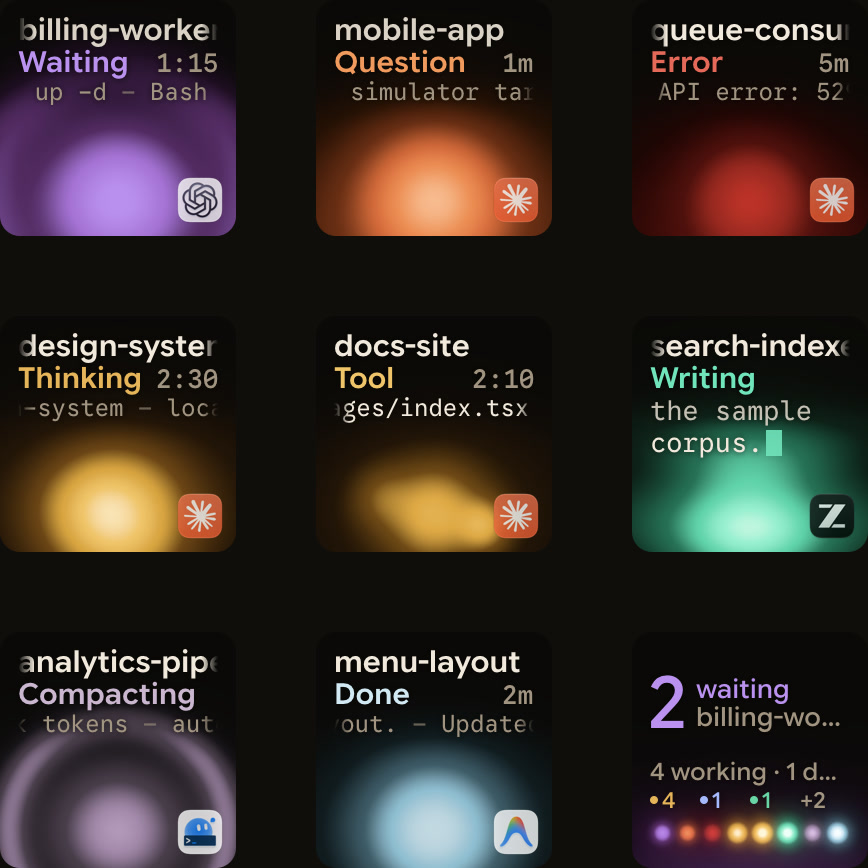
Claude Code can notify you when it finishes or stops at a permission prompt, but its desktop notifications only work by default in Ghostty, Kitty and iTerm2, leaving Windows Terminal silent. On Windows, enable the terminal bell or add a Notification hook that opens a Windows dialog. For several sessions, Orbtile's status pad shows which one is waiting.
1. The terminal bell
Add this to %USERPROFILE%\.claude\settings.json:
{
  "preferredNotifChannel": "terminal_bell"
}
Claude Code then rings the terminal bell when it needs you. What the bell does depends on your terminal's settings: a sound, a flash, or both.
For Windows Terminal bellSound audio files, Apple Terminal bell settings and Notification or Stop sound hooks, see Claude Code notification sound: terminal bell and audio hooks.
For setting up PowerShell, CMD and WSL profiles, split panes and fullscreen rendering in Windows Terminal, see Claude Code in Windows Terminal: setup, profiles and keys.
2. A dialog from a Notification hook
For something you can't miss, a Notification hook can open a Windows dialog box through PowerShell:
{
  "hooks": {
    "Notification": [
      {
        "matcher": "",
        "hooks": [
          {
            "type": "command",
            "command": "powershell.exe -Command \"[System.Reflection.Assembly]::LoadWithPartialName('System.Windows.Forms'); [System.Windows.Forms.MessageBox]::Show('Claude Code needs your attention', 'Claude Code')\""
          }
        ]
      }
    ]
  }
}
It's a dialog box, not a notification in the corner of the screen, so it can open behind your terminal window. Run the PowerShell part on its own first to check it works. An empty matcher fires on every notification type; set it to permission_prompt to be told only about permission requests.
For native installation, PATH setup, execution policies and the PowerShell tool itself, see Claude Code in PowerShell: install, setup and commands on Windows.
If you run Claude Code inside WSL, powershell.exe has to be on your path through Windows interop. If a hook fails with "blocking because Git Bash wasn't found", Claude Code couldn't find Git Bash on Windows; the hooks reference on code.claude.com has the fixes.
For the full WSL setup, including Windows Terminal bell styles, tmux passthrough and PowerShell hooks, see Claude Code WSL notifications: get alerts on Windows.
If you also use Google Antigravity on Windows, see Google Antigravity Windows notifications: CLI and desktop alerts for its CLI bell, hooks and Remote Control alerts.
3. See every session at once
A bell or a dialog tells you that some session needs you. With four sessions in four tabs, you still have to find which one.
Every trip to another tab to find it is a context switch for you; Context switching with AI coding agents: what it costs explains what research shows and how to cut needless switches.
Orbtile runs on Windows 11 (x64) and shows every Claude Code session as its own key on the Logitech MX Creative Keypad, or a tile on an iPhone or Android phone with Orbtile Mobile. The session that's waiting moves to the front, and you can answer its permission request from the key: press Deny, or hold Allow until its ring fills.
Get Orbtile from the Microsoft Store on the download page. Prefer the installer (MSI)? It installs for your Windows user, without administrator rights. The first time you run it, Windows SmartScreen says “Windows protected your PC”, because the installer is signed with Orbtile’s own certificate: choose More info, then Run anyway. With a phone, allow Orbtile when Windows Security asks about networks.
FAQ
Why don't I get a notification in Windows Terminal?
Claude Code sends its desktop notification only in Ghostty, Kitty and iTerm2. Set preferredNotifChannel to "terminal_bell", or add the Notification hook above.
Does Orbtile support Codex on Windows?
Yes, from Orbtile 0.3.0. On Windows, Orbtile supports Claude Code, Codex, ZCode, Antigravity and sessions on remote servers, and Kimi Code from 0.3.6.
Can I use the MX Creative Keypad with Logi Options+ installed?
Yes. On Windows, choose Take Over Keypad in Orbtile; choosing Release keypad, holding both page buttons for 1.5 seconds, or quitting Orbtile hands it back. See Use the Logitech MX Creative Keypad without Logi Options+.