
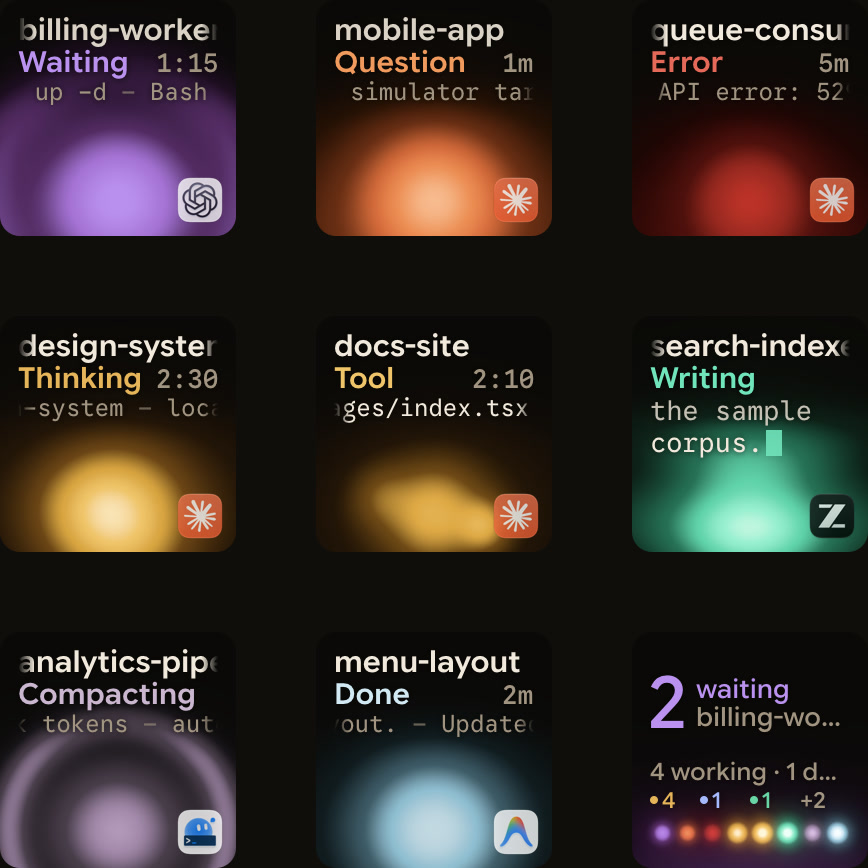
For Claude Code, an Elgato Stream Deck runs shortcut profiles and plugins, while the Logitech MX Creative Keypad gives you IDE controls and prompt macros through Logi Options+. Elgato lists a Claude Code Shortcut Profile with 100 slash commands and a Windows-only Claude Code Usage plugin. Logitech lists VS Code and IntelliJ integrations, and prompt macros for GitHub Copilot, Claude Code and OpenAI Codex. The classic Stream Deck has 15 LCD keys for $149.99 and needs Windows 11 or newer or macOS 13 or newer. The MX Keypad has nine for $99.99 and needs Windows 10 or later (not ARM64) or macOS 13 or later, with Logi Options+ 2.07 or later. Without Options+, Orbtile shows live Claude Code, Codex, ZCode, Antigravity and Kimi Code sessions on the MX Creative Keypad, and you answer supported requests on the keys. Orbtile Mobile does the same on an iPhone or Android phone.
The hardware
| Elgato Stream Deck | Logitech MX Creative Keypad | |
|---|---|---|
| Screen keys | 15 LCD keys on the classic Stream Deck, 6 on the Stream Deck Mini | 9, plus two page buttons |
| Sold as | One device per size | The MX Keypad on its own, or with the dialpad as the MX Creative Console |
| Its own app | Stream Deck app | Logi Options+ |
| Operating systems | Windows 11 or newer, macOS 13 or newer | Windows 10 or later (not ARM64), macOS 13 or later |
| US price on 12 November 2026 | $149.99 for the 15-key Stream Deck on Elgato's US store | $99.99 for the standalone MX Keypad on Logitech's US store |
| App layout switching | Smart Profiles | App-aware context switching |
| Custom plugin SDK | An SDK from Elgato | Logi Actions SDK |
The MX Keypad sold on its own is the same keypad as the one in the MX Creative Console.
The classic Stream Deck comes with classic membrane keys or scissor keys, a removable magnetic stand and a 150 cm (59 in) USB-C to USB-C cable with a 90-degree connector. The MX Keypad comes in Graphite and is made with recycled plastic.
Elgato's product page gives further hardware details across the Stream Deck range:
- Elgato sells Stream Deck in 6-key, 15-key and 32-key sizes, plus Stream Deck +, Stream Deck Neo, Stream Deck Studio, Stream Deck Pedal and Galleon 100 SD.
- Classic keys use membrane switches for a soft, cushioned press, while scissor keys give a crisper, more responsive feel.
- Without its stand, the 15-key Stream Deck measures 118 x 84 x 25 mm and weighs 145 g, or 270 g with the stand.
- The 6-key Stream Deck Mini has an integrated stand, measures 84 x 60 x 58 mm and weighs 160 g.
- You can personalise a Stream Deck with interchangeable faceplates, icons, labels and wallpapers.
- The 15-key Stream Deck connects over USB 2.0, requires a USB-C port, and supports faceplates and the Elgato Network Dock.
For a broader comparison of hardware and virtual keypads, see Stream Deck alternatives for developers and coding agents.
To include Loupedeck in the decision, read MX Creative Keypad vs Loupedeck vs Stream Deck for developers.
The software: Stream Deck app and Logi Options+
Here is what each app offers, followed by Logitech's steps for a manual profile.
In the Stream Deck app:
- Smart Profiles automatically switch your button layout based on which application you have open.
- Multi Actions trigger a sequence of actions from one key press and support delays between steps.
- Key Logic assigns up to three actions to one key for a single press, double press or press-and-hold.
- Pages give you additional layouts, and Folders nest more actions behind a single key.
- Pinned Actions keep essential controls visible across every Stream Deck profile.
- Profiles at Scale ensures every workstation starts with the same key layout and workflow.
- Random Action assigns multiple actions to one key and picks one at random each time you tap it.
- Virtual Stream Deck puts customisable keys on your screen.
- Stream Deck Mobile provides a 6-key virtual deck on your phone.
- Hotkeys send keyboard shortcuts to apps that have no plugin.
- Elgato supplies an SDK and documentation for building custom plugins.
In Logi Options+:
- The standalone MX Keypad requires Logi Options+ version 2.07 or later, while the MX Creative Console requires version 1.83 or later.
- Logitech's support page states that the MX Keypad cannot be used without Logi Options+ installed.
- Without Logi Options+, the MX Creative Console dialpad can only run a very limited set of basic actions.
- The Logi Plugin Service manages the plugins and Marketplace and activates only when you connect the console or keypad.
- Logi Options+ supports 19 languages, while the console and keypad configurator supports English, French, German, Japanese, Italian and Spanish.
- You can use the default profile and the pre-installed System plugin without signing in.
- Downloading other plugins or installing other application profiles requires signing in with a Logi ID.
- From Logi Options+ version 1.99, every plugin on the official Logitech Marketplace goes through a security review.
- You can still install third-party plugins from other sources, and Options+ displays a security notification.
To use the MX Keypad in Logi Options+ with an application that does not have a Marketplace plugin, create a manual profile and map keyboard shortcuts:
- Click the
+icon in the profile bar and chooseAPPLICATION PROFILE. - Select your application from the list, or scroll down and click
ADD APPLICATIONto point to its executable file. - Click
START WITH A BLANK TEMPLATE, give the profile a name and clickCONFIRM. - In the right panel, click
ALL ACTIONSand select theSYSTEMplugin. - Drag
KEYBOARD SHORTCUTunderKEYBOARDonto a key. - Click the
KEYtext field, press your key combination, optionally rename the action and clickSave.
For more on how Logitech's console and keypad work inside Options+, see The Logitech MX Keypad for developers, with and without Options+ and MX Creative Console: setup, profiles, plugins and agents.
What the keys can do for an agent
On a Stream Deck, you add a profile or plugin for the agent you use. The Elgato Marketplace lists a Claude Code Shortcut Profile with 100 slash commands across 8 folders, for macOS and Windows. Elgato's article on controlling Claude also lists a Claude Code Usage plugin, for Windows only, that shows your spend, plan limits and session countdown. It also lets you launch a session or watch your background agents. Without a plugin, hotkeys send keyboard shortcuts to apps such as your terminal or editor, and Multi Actions run a sequence of them from one key. Elgato lists coding among the Stream Deck's workflows. Its Stream Deck page also highlights plugins for Zoom, Slack, Discord, Spotify, PowerPoint, Photoshop, Twitch, OBS, Minecraft, Weather, Clocks, Audio Switcher and Window Mover.
On the MX Creative Keypad with Logi Options+, Logitech lists VS Code and IntelliJ integrations to move through code, start agents, manage debugging and show or hide the terminal. Prompt macros, refactoring and voice commands work across GitHub Copilot, Claude Code and OpenAI Codex, and need an internet connection and an account with each AI provider. You can also build your own tools with the Logi Actions SDK.
Logitech also notes that most plugins ship with ready-to-use profiles, and that app-aware context switching swaps tools automatically as you move between VS Code, Slack, Figma and more. On its plugins support page, Logitech lists supported plugins for Adobe apps such as Photoshop and Premiere Pro, Ableton Live, Zoom, Capture One, MS Teams, Philips Hue, Spotify, Apple Music, Discord, Streamlabs Desktop, OBS Studio and Twitch.
On the MX Creative Keypad with Orbtile, without Options+:
- Keys 1 to 8 show one Claude Code, Codex, ZCode, Antigravity or Kimi Code session each, with its state and latest words.
- The session that needs you moves to the front, and a tap on key 9 jumps to it.
- In Focus mode, you press Deny on key 7 or hold Allow on key 9 for 0.6 seconds for supported permission requests.
- Supported multiple-choice questions put options on keys 1, 2, 3 and 7, and you hold Send on key 9.
- Sessions on SSH servers show up next to your local ones on the same keypad.
Orbtile drives the keypad directly over USB, so you don't need a plugin inside Logi Options+, and Options+ stays installed for your other devices.
Orbtile runs on a computer: a Mac with Apple silicon and macOS 14.0 Sonoma or later, or a Windows 11 PC (x64). It needs no account to drive the keypad. While Orbtile controls the keypad, your Options+ profile for it pauses. See Use the Logitech MX Creative Keypad without Logi Options+ for how the handover works.
What you can answer from the keypad depends on the agent:
- Claude Code takes local approvals and multiple-choice answers with up to four options on the keys.
- Compatible local Codex desktop chats take offered Allow or Deny command decisions and supported multiple-choice answers.
- For Codex terminal command approvals, the keys offer Allow only, and you decline in the terminal.
- ZCode takes permission decisions on the keys.
- The Antigravity desktop app takes answers to up to four questions, with two to four numbered choices each.
- Antigravity CLI and IDE sessions do not appear, and Antigravity permissions and written answers stay on your computer.
- Kimi Code takes approvals for up to 2 minutes, and answers with listed options, for sessions in Kimi's own server.
- You start that server with
kimi weborkimi rc, or hand a terminal session over to it with/rc. - You answer other Kimi Code sessions on the computer.
- Sessions on SSH servers are display-only, except Allow for Codex terminal command approvals, so you answer everything else on the host.
To start Kimi's local browser server and configure its ports, tokens and Remote Control link, see Kimi Code web UI: kimi web, /web, tokens and LAN setup.
Or no new hardware at all
Orbtile Mobile turns an iPhone (iOS 17 or later) or an Android phone (Android 8.0 or later) into the same pad: one tile per session, the waiting one first, and answers on the screen. You can use the phone and the keypad together.
To connect a phone, sign in with the same Orbtile account on your computer and phone on the same local network, then turn on Phone pad in Settings > Keypad.
Which one to pick
| You… | Pick |
|---|---|
| Already own a Stream Deck and use Claude Code | The Claude Code Shortcut Profile or Usage plugin, or hotkeys and Multi Actions, in the Stream Deck app |
| Want IDE controls and prompt macros in Logi Options+ | The MX Keypad with Logi Options+ |
| Run several agents at once, in terminals or on servers | The MX Keypad with Orbtile |
| Don't want to buy anything yet | An iPhone or Android phone with Orbtile Mobile |
FAQ
Does Orbtile work with a Stream Deck?
No. Orbtile drives the Logitech MX Creative Keypad, iPhones and Android phones.
Is the MX Keypad the same as the MX Creative Keypad?
Yes. The MX Keypad sold on its own is the same keypad as the one in the MX Creative Console.
Do I need Logi Options+?
For Logitech's own profiles and plugins, yes. Orbtile drives the keypad over USB without Options+, and with Options+ installed, you can switch the keypad between Orbtile and Options+ at any time.
What is the main hardware difference between the classic Stream Deck and the MX Keypad?
The classic Stream Deck has 15 LCD keys, with membrane or scissor keys and a removable stand. The MX Keypad has nine LCD keys and two page buttons.